Last Updated: November 2, 2026
Quick Summary
Most blurry event photos come down to one of four causes: subject motion, camera shake, missed focus, or lens softness. Diagnose which one you have by checking what is sharp at 100%, then fix it: raise shutter speed to 1/250s or faster for dancing, brace against a wall for camera shake, or move the focus point onto the eye for missed focus.
- Keep your shutter at 1/125s or faster for most event work, and 1/250s or quicker for dancing.
- Take one test shot of a static subject to separate camera shake and lens issues from subject movement.
- Stabilisation counteracts camera shake but cannot freeze a moving subject on the dance floor.
- Use continuous autofocus with subject tracking, then zoom into the face on the rear screen to verify.
- Apply light noise reduction before sharpening, never the other way around.
Table of Contents
- Diagnosing Why Your Event Photos Come Out Blurry
- Event Photography Camera Settings That Keep Shots Sharp
- Choosing the Right Shutter Speed for Event Photography
- Mastering Event Photography in Low Light
- Autofocus Settings for Event Photography and Focus Verification
- Flash, Lenses and Stabilisation Limits Explained
- Saving a Soft Gallery: Editing and Recovery Decisions
- Book a Photographer Who Gets Sharpness Right First Time
- Frequently Asked Questions
Diagnosing Why Your Event Photos Come Out Blurry
Most blurry event photos come down to one of four causes: subject motion, camera shake, missed focus, or lens softness. Each has a different fix, and treating the wrong one wastes your night. Guessing here can cost you the whole gallery.
Here’s the hard truth: no single setting saves a soft shot. You need to know why it went soft first. Use this diagnosis guide before you touch a dial.
Step 1: Look at what is sharp and what is not
Zoom to 100% on the rear screen or in your editing software and ask one question: is anything in the frame genuinely sharp?
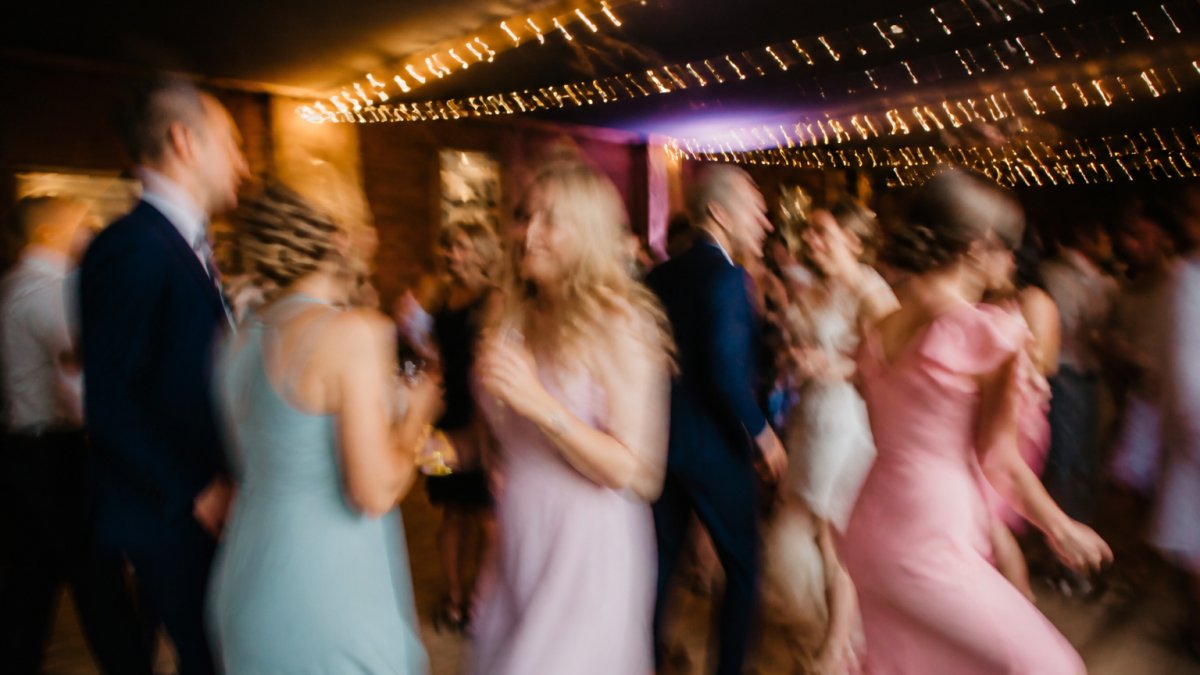
- Nothing is sharp, and the blur runs in one direction, that is subject motion. A dancing guest’s arm becomes a streak that follows their movement.
- Nothing is sharp, and the blur is even across the whole frame, that is camera shake. Walls, tables and faces all smear the same way.
- Something is sharp, but it is not the face, that is missed focus. The background or a shoulder is crisp while the eyes are soft.
That last distinction fools a lot of people. They blame the lens or the light when the real problem is where the focus point sat, or a smudge on the glass they never checked.
Step 2: Match the cause to the fix
| What you see | Most likely cause | First fix to try |
|---|---|---|
| Directional smear on a moving subject | Subject motion | Raise shutter speed (1/250s or faster for dancing) |
| Even blur across the whole frame | Camera shake | Brace against a wall, raise shutter, check stabilisation is on |
| Sharp background, soft face | Missed focus | Move the focus point onto the eye, use subject tracking, verify on the rear screen |
| Soft everywhere on a static subject | Lens softness or dirt | Clean the front element, test at a smaller aperture, check calibration |
A common mistake is bumping ISO to fix blur that’s actually a focus problem. That just adds image noise and leaves you with a soft, grainy shot. Equally, adding flash to camera shake brightens the frame without removing the smear.
Step 3: Confirm the diagnosis with one test shot
Before you commit to a fix, take a single test shot of a static subject, a table setting, a sign, a seated guest, at your current settings. If that shot is sharp, your settings are fine and the blur is coming from subject movement or focus placement. If the static shot is also soft, the problem is camera shake, lens softness or a focus calibration issue.
Keep a small notebook or phone note of which cause appeared in which room. Patterns emerge fast, the same dark corner will produce the same problem every time you shoot there.
Event Photography Camera Settings That Keep Shots Sharp
Start with Aperture Priority for speed, then switch to manual once the room’s lighting settles. The settings that keep shots sharp are a fast shutter, a wide enough aperture, and an ISO you’re willing to live with. Get the shutter right first; everything else follows.
Here’s the priority order we use on site:
- Shutter speed high enough to freeze the action.
- Aperture wide enough to gather light without losing depth of field.
- ISO raised only as far as needed to support the first two.
The Royal Photographic Society’s guide to exposure is a solid refresher on how these three trade off against each other.
A Repeatable Setting Workflow for Changing Rooms
Rooms change fast. A ceremony space is dim, the dance floor is darker, the marquee has daylight bleeding in. Use this workflow every time you move:
- Meter the new space with a test shot
- Set shutter to your minimum safe speed
- Open the aperture to its widest usable setting
If you’re scouting a venue ahead of time, a venue guide for event spaces helps you plan settings before you arrive.
Choosing the Right Shutter Speed for Event Photography
For most event work, keep your shutter at 1/125s or faster. Dancing and fast movement need 1/250s or quicker. Below 1/125s, camera shake and motion blur start winning. Shutter speed for event photography is the single setting that decides whether your usable shots survive.
A quick guide:
- Speeches and portraits: 1/125s to 1/160s
- Dancing and movement: 1/250s and up
- Fast action, confetti, jumping: 1/500s
The catch is light. A faster shutter means less light reaches the sensor, so you compensate with a wider aperture or higher ISO. That’s the whole game in a dim venue.
Mastering Event Photography in Low Light
Event photography in low light is a balancing act between shutter, aperture, and ISO. There’s no magic setting, just disciplined trade-offs. Available light is often better than flash at a reception, but only if you can hold a fast enough shutter.
Here’s what works:
- Use a wide aperture (f/2.8 or wider) to pull in light.
- Push ISO but know your camera’s clean limit.
- Lean on fast primes when the light drops.
Watch out: raising ISO to fix a shutter that’s too slow trades one problem for another. You get a brighter image that’s still soft, now with more image noise.
Autofocus Settings for Event Photography and Focus Verification
Set continuous autofocus with subject or eye tracking, then verify focus on the rear screen before you trust a burst. Autofocus settings for event photography matter more than most people think.
A typical setup for event work is:
- Continuous AF with subject tracking for moving guests
- A single, well-placed focus point for speeches and portraits
- Back-button focus so the shutter doesn’t re-hunt mid-burst
Verification is the step people skip. Zoom into the face on the rear screen after a test shot. If the eyes aren’t sharp, nothing else matters.
Flash, Lenses and Stabilisation Limits Explained
A fast lens beats a flash for atmosphere, but flash beats a slow lens in near-darkness. The honest answer is you need both tools and the judgement to pick. A 24-70mm f/2.8 zoom covers most of a reception. A fast prime at f/1.8 handles the darkest corners.
What stabilisation can and cannot do
In-body or lens stabilisation counteracts the small movements of your hands during the exposure.
What it cannot do is freeze a moving subject. If a guest is dancing, their movement is recorded for as long as the shutter is open, no matter how still your hands are.
A practical rule: use stabilisation to buy yourself a slower shutter for static scenes, speeches, details, room shots, but switch your thinking to shutter speed the moment people start moving.
Flash: when it helps and when it hurts
Flash adds light instantly, which lets you use a faster shutter and a smaller aperture. That freezes motion and increases depth of field. The trade-off is that direct flash flattens a room, kills the ambient atmosphere, and can be distracting during speeches.
- Use flash when the room is genuinely dark, when you need to freeze fast action, or when you need a reliable colour balance.
- Avoid direct flash during quiet moments, ceremonies and speeches where it breaks the mood. Bounce or diffuse it where the ceiling allows.
- Balance flash with ambient light by dragging the shutter slightly, a slower shutter lets the background lights register while the flash freezes your subject.
Lenses: speed versus flexibility
A fast lens lets in more light, which supports a faster shutter without raising ISO. That is why primes are prized in dim venues. The cost is that you must move to frame, which is not always possible on a crowded floor.
- Fast zoom (f/2.8): the workhorse for most of a reception; flexible framing, decent low-light performance.
- Fast prime (f/1.4 to f/1.8): the darkest corners and the most atmospheric available-light shots; less flexible.
- Slow kit lens: fine in good light, but it will force you into slow shutters or high ISO in a dim room.
Tripods and supports
Tripods help for static setups, a ceremony wide shot, a detail table, a timed group portrait, but they get in the way on a busy floor and slow you down. For event work, a monopod or a simple brace against a wall or column is often more practical than a full tripod.
Stabilisation, flash and fast lenses all help with light and steadiness, but none of them will rescue a shot where the focus landed on the wrong place. Check focus before you blame the equipment.
- Fast lens: freezes action, keeps available light
- Flash: adds light but can flatten a room
- Stabilisation: kills camera shake, not motion blur
Saving a Soft Gallery: Editing and Recovery Decisions
Not every soft shot is lost, but you need a clear decision tree before you start editing. Ask three questions in order:
- Is it motion blur? If yes, sharpening won’t save it. Consider it a discard.
- Is it camera shake? Mild shake can sometimes be recovered with careful sharpening.
- Is it missed focus? Usually a discard unless the softness is minor.
For the keepers, apply light noise reduction before sharpening, never the other way around. Cropping tight hides minor softness but magnifies noise. And a soft shot converted to black and white can sometimes pass as a moody candid. Use that sparingly.
The Adobe guide to sharpening and noise reduction walks through the order of operations in detail.
Book a Photographer Who Gets Sharpness Right First Time
The best fix for blurry event photos is a photographer who nails sharpness before the shutter fires. Explore pet photography sessions for portraits and event coverage. Settings, focus, and light discipline are what separate a usable gallery from a soft one. Read our engagement photography tips for couples and announcements.
Get started with Click Shoot Entertainment and get a gallery you’re proud to share.
Frequently Asked Questions
Why do event photos come out blurry?
Three things cause it: subject movement, camera shake and missed focus. If the whole frame streaks, your shutter speed was too slow for the movement. If everything is soft in the same direction, you moved the camera. If the background is sharp but faces are not, autofocus grabbed the wrong point. Check the culprit first, then fix that one setting rather than changing everything at once.
What shutter speed should I use for event photography?
Start at 1/125s for posed groups and toast moments, and move to 1/250s or faster once people are dancing or walking toward you. For children and fast movement, 1/500s is safer. If light is tight, raise ISO before you drop below 1/125s, because a slightly noisy sharp photo beats a clean blurry one every time.
How do I take sharp photos in low light at an event?
Use a wide aperture such as f/2.8, let ISO climb to 3200 or 6400, and keep shutter speed at 1/125s or above. Shoot in short bursts so at least one frame lands between hand movements. If the venue allows it, a small amount of bounced flash lifts the exposure enough to hold a faster shutter speed without washing out the room.
Can a flash help prevent blurry event photos?
Yes, when it is the flash doing the freezing rather than the shutter. A brief burst of flash freezes movement, so a slow shutter speed can still produce a sharp subject with a little ambient blur behind them for atmosphere. Ask the venue first, keep the flash off-camera or bounced, and avoid firing directly at guests during speeches.